Remote Control Robotic Pool Cleaner: Is It Worth It?
The iQuavia puts useful poolside controls on a cordless robot. I used the remote to run floor cleaning, command wall movement, retrieve it at the wall, and empty its top basket.
Affiliate disclosure: As an Amazon Associate I earn from qualifying purchases. This article may contain affiliate links, which means I may earn a commission at no extra cost to you.
The iQuavia Robotic Pool Cleaner with Remote Control is aimed at the pool owner who does not want to simply drop in a robot and hope it visits every area that matters. In my first use, I operated this remote control robotic pool cleaner from poolside, selected bottom cleaning, commanded wall movement, paused it, and brought it to the sidewall when I was ready to remove it. That last function is more useful than it may sound when the unit is sitting underwater and is heavy to lift.
A cordless pool robot can be appealing because there is no floating cable to manage while it works. What makes this one different is that the remote is part of the actual cleaning workflow, not just an extra accessory. I could let the cleaner begin its floor pattern, then use the controls when I wanted a different movement or an easier retrieval point. It took a short adjustment period to understand the remote-control approach, but I found that it added practical options rather than complication for its own sake.
A good fit for pool owners who want more control than a set-it-and-forget-it robot offers. The remote makes wall retrieval and mode changes genuinely useful, though the heavy unit and slightly unfamiliar controls add a little handling work.
As an Amazon Associate I earn from qualifying purchases.
This review focuses on what I used and saw in the pool: the remote functions, floor movement, wall movement, sidewall retrieval, and top-access debris basket. The product is also described as having app support, an optional buoy accessory, waterline capability, and sun-shelf coverage with the applicable setup. I did not use the app or buoy, and I did not run dedicated waterline or sun-shelf cleaning tests, so I treat those as product claims rather than my own results.
| Type | Cordless robotic pool cleaner |
|---|---|
| Control | Included poolside remote |
| Cleaning modes used | Bottom clean and wall movement |
| Retrieval | Remote-guided sidewall approach |
| Debris access | Top-access removable basket |
| Stated runtime | Up to 210 minutes |
How this remote control robotic pool cleaner worked in my pool
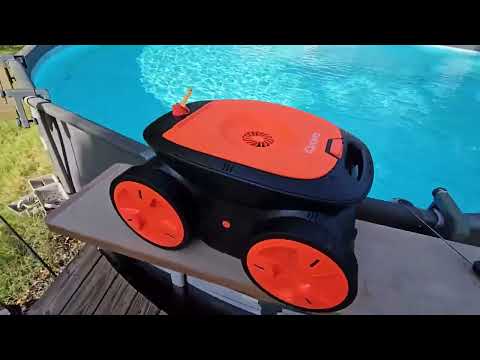
I started by looking over the cleaner before putting it in the water. The iQuavia has four large independent tires, substantial brushes at the front and back, openings underneath for debris intake, and a top-access section for the debris basket. It looks like a substantial pool robot because it is one. The unit is heavy when carrying it outside the pool, which is worth knowing before buying, but that same weight helped it drop to the bottom without much effort when I put it in the water.
That easy sink-in matters in the basic setup. I did not have to hold the cleaner underwater or struggle to get it settled before it began. Once it was in the pool and powered on, I worked from the side using the included remote. The available controls included auto clean, bottom clean, up wall, down wall, pause, and start/stop. There is also a buoy-related option mentioned with the remote system, although I did not use an optional buoy accessory.
The pause control gave me a clear indication that the command had registered. When I held pause, the status light changed to yellow. When I released it, the cleaner resumed. This is a small detail, but it made the remote feel less abstract during first use. I was not guessing whether the unit had responded while it was underwater.
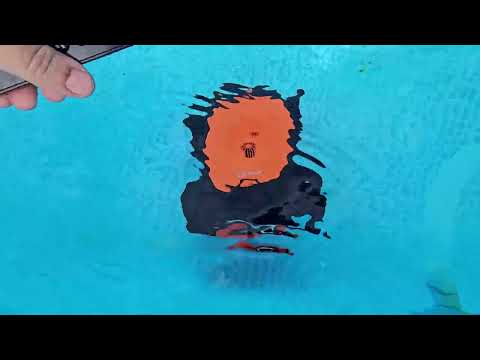
I selected bottom-clean mode and watched the cleaner begin traveling across the pool. The stated operating approach is that it scans the pool shape and uses a cross-pattern path for floor cleaning. What I saw in my pool was the beginning of the zigzag, back-and-forth, snake-like coverage pattern. It traveled across the floor, encountered the pool walls, and turned itself around to continue. That is the core task I expect from a robot cleaner: keep moving over the floor while drawing in water and debris it comes across.
The remote changes the experience around that automatic movement. With a fully hands-off robot, I would normally wait for the program to continue or finish. Here, while it was in that cleaning phase, I could stop it and use the controls to move it more like a remote-control vehicle if I wanted to interrupt the routine. That is potentially useful for a missed patch, a debris area, or simply repositioning the cleaner instead of waiting for the programmed pattern to reach a spot.
I would not describe the remote as completely intuitive the first moment you pick it up. It is a different way of using a pool cleaner, and I needed a little time to figure it out. But the buttons correspond to understandable cleaning actions: floor cleaning, wall movement, pause, and start or stop. After that initial adjustment, I saw the advantage of having a pool robot that can run a cleaning pattern while still accepting poolside input.
Why wall movement and retrieval are the standout features
I also watched the cleaner climb a pool wall. From the remote, I had up-wall and down-wall commands available. After it climbed, I used the down-wall control and it headed back down as expected. This was useful confirmation that wall movement was not merely a label on the remote; I was able to call for movement and see the cleaner respond at the wall.
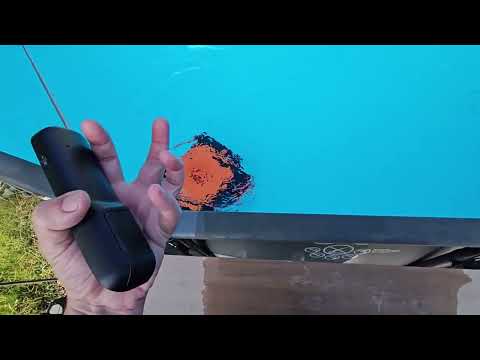
The more buyer-relevant feature, in my view, is retrieval. After the cleaning run, the cleaner was against the sidewall. I used the remote to bring it up the wall for removal. The green light came on, the unit approached the wall, and I was able to pull it out. Bringing a heavy robot to an accessible sidewall is better than reaching into the pool for a machine that has stopped in a deep or inconvenient area.
This does not eliminate the fact that the iQuavia is heavy out of the water. I still had to lift it once it reached me. What it does reduce is the awkwardness of locating and grabbing a submerged cleaner first. For pool owners who regularly retrieve a robot after a cycle, that is a tangible quality-of-life advantage. The remote gives you a way to make the end of the session more deliberate instead of hoping the cleaner happens to stop within reach.
It also helps define who this product is for. If you want the most passive possible routine, where you never want to use a remote at all, a simpler automatic cleaner may fit better. If you like the ability to intervene during a session, move the robot in a particular direction, or call it to the wall at the end, the iQuavia’s control system is the reason to consider it.
The manufacturer describes the four independent tires as helping the cleaner travel across floors, walls, and depth changes. I saw floor travel and wall movement, but I did not specifically test sharp depth transitions. Likewise, the product is described as able to clean floors, walls, waterlines, and sunbathing shelves with the applicable setup. My hands-on use covered floor cleaning and wall movement, not every listed surface.
What the floor-cleaning run told me
During bottom-clean operation, I watched the iQuavia start its back-and-forth path rather than moving randomly in one place. It began crossing the pool and changing direction when it met the walls. The stated full process involves scanning the pool and working in a cross-pattern, but I am only calling out the beginning zigzag behavior I actually saw during my use.
As it traveled, the cleaner was intended to pick up debris that it encountered through the underside openings and into the basket. After the run, I found visible small debris in the basket. That is a straightforward but important result: it was not only moving through the pool; it collected debris during the demonstrated cleaning session.
I did not sort, weigh, or identify every particle in the basket, and I did not conduct a capacity test with heavy leaf loads or unusually large debris. So I cannot say how much debris it can manage before it needs attention. What I can say is that, in my first run, there was visible small debris inside when I removed the basket. For regular cleanup of the kind of small material a pool robot encounters, that was the outcome I wanted to see.
The product’s stated runtime is up to 210 minutes. I did not time a complete battery cycle, so that number should be understood as the stated maximum, not a runtime I measured. The same caution applies to charging time, longer-term battery performance, remote range, and connection reliability at a distance: I did not test those scenarios in this first use.
Emptying the iQuavia basket is simple once you know its orientation
After pulling the cleaner out of the pool, I opened the top-access area and removed the debris basket. It pulls straight out, which is exactly the type of access I prefer for routine pool maintenance. I could inspect what it had collected without turning the entire robot upside down. The top placement also keeps the cleanup process focused on the basket rather than on wrestling with the full machine.
The basket assembly includes removable screen or filter components. I removed a screen by pinching its designated points, and both sides need to be cleaned. That is normal ongoing maintenance, not a surprise drawback. The cleaner has to trap debris somewhere, and the screens are part of that process. Buyers should expect to clean them after debris collection rather than treating the robot as maintenance-free.
The one detail to remember is basket orientation. I found that the basket needs to go back in with its handle facing the correct direction for it to seat properly. If it does not drop into place easily, do not force it. Check the handle direction, align it properly, and reinstall it. It is a minor learning point, but it is relevant because an orientation-specific basket is less convenient than one that can be inserted either way.
For me, the top-access design still outweighs that small catch. I could open the area, pull the basket, see the debris, access the removable screens, clean the relevant parts, and reinstall the assembly. That is a practical workflow for someone who will be maintaining a pool robot regularly.
+ Pros
- Poolside remote provides auto, floor, wall, pause, and start/stop control
- Remote-guided wall approach makes retrieval easier
- Top-access basket pulls straight out for cleanup
- Collected visible small debris in my first cleaning run
- Large tires, front brushes, and rear brushes give it a substantial cleaning setup
− Cons
- Heavy to carry and lift outside the pool
- Remote controls take a little time to learn
- Basket must be reinstalled in the correct orientation
Who should buy the iQuavia pool robot?
I would consider this cleaner if you want a cordless robotic pool cleaner but do not want to give up control completely. The remote makes sense for someone who wants to select bottom cleaning, command wall movement, pause the robot, or intervene while the cleaner is working. It is especially appealing if you value the ability to bring the robot to the sidewall when the session is done.
It also fits owners who prefer a top-access removable basket. I liked being able to remove the basket from above, check what had been collected, and access the filter-screen components without having to flip the cleaner around. Since the basket collected visible small debris in my first run, that access was not just a design feature I noticed before use; it was part of the normal cleanup afterward.
This can be a good match for compatible inground or above-ground pool owners who see a use for touch-up direction. An automatic cleaning pattern is useful for routine coverage, but there are times when it is handy to have input from the poolside. The remote-control approach provides that extra layer of choice.
I would look elsewhere if your highest priority is the lightest possible cleaner to carry. This is a heavy unit outside the water. The sidewall retrieval feature helps reduce the inconvenience of reaching for it in the pool, but it does not change the lifting weight once the cleaner is out. I would also skip this style if you know you do not want to learn or use remote controls. The basic functions made sense after I used them, but manual input is central to what differentiates this model.
Buyer considerations before choosing a remote-guided cleaner
The clearest buying decision is whether you value control more than complete simplicity. A conventional automatic robot can be attractive because you place it in the pool and leave it alone. The iQuavia can do bottom cleaning on its own, but it also lets you change the interaction when you want to. In my use, that mattered most for wall movement and retrieval.
Plan for normal debris-basket maintenance. The screens need cleaning on both sides after collecting debris, and the basket has to be reinstalled in the proper direction. Neither issue was difficult, but both are part of owning this cleaner. If you prefer to inspect and maintain the debris system from the top, the layout is favorable.
Keep the distinction between demonstrated functions and stated capabilities in mind. I used the included remote and saw the floor pattern begin, wall movement, sidewall retrieval, top-basket access, and collected debris. I did not use the app connection, optional buoy, waterline cleaning, sun-shelf cleaning, or a full claimed runtime. Those may matter to your purchase decision, but they are not areas where I can give a firsthand result from this use.
Finally, the remote is most valuable when it solves a real annoyance in your pool routine. If you have ever wanted to move a robot during a session or wished it would come to the wall rather than stop somewhere inconvenient, this design addresses that problem directly. If that is not a concern for you, the remote may be less important than other factors such as weight and basket maintenance.
Specs
| Spec | Detail |
|---|---|
| Product | iQuavia Robotic Pool Cleaner with Remote Control |
| Drive setup | Four large independent tires |
| Brushes | Large front and rear brushes |
| Remote functions | Auto clean, bottom clean, up wall, down wall, pause, start/stop |
| Debris system | Top-access removable basket with removable filter screens |
| Claimed runtime | Up to 210 minutes |
| Claimed connectivity | App, remote, and optional buoy accessory |
| Claimed coverage | Floors, walls, waterline, and sunbathing shelves with applicable setup |
Scorecard
Mode changes, wall movement, pause, and retrieval were useful in my pool.
Top basket and removable screens were easy to reach.
It ran the floor pattern and collected visible small debris.
It sinks easily, but it is heavy out of the water.
The controls take a short adjustment period, then make sense.
Frequently asked questions
Can you control the iQuavia pool cleaner from the side of the pool?
Yes. I operated it from poolside with the included remote. The controls I used included auto clean, bottom clean, up wall, down wall, pause, and start/stop. The pause function changed the status light to yellow while I held it, which gave me a clear indication that the command was active.
Can the remote bring the cleaner to the wall for removal?
Yes. After the cleaning run, I used the remote to bring the robot up the sidewall so I could retrieve it. This is one of the most useful remote functions because it avoids having to locate and reach down for a heavy cleaner sitting underwater.
Does the iQuavia pick up small pool debris?
It did in my first run. I removed the top-access basket afterward and found visible small debris inside. I did not test the maximum debris capacity or performance with unusually heavy leaf loads.
How do you clean the filter area?
Remove the top basket, then remove the screen or filter components by pinching their designated points. Both sides of the screens need cleaning. When reinstalling the basket, make sure the handle faces the correct direction so the assembly seats properly.
Is this robotic pool cleaner heavy?
Yes. It is heavy when handling it outside the pool. On the positive side, its weight helped it sink to the pool bottom easily when I placed it in the water. The remote-guided sidewall approach also makes it easier to position for removal before lifting.
Did you test the app, buoy, and full runtime claim?
No. I used the included remote during this first use. The product is described as supporting an app, remote, and optional buoy accessory, and it is advertised for up to 210 minutes of runtime, but I did not test the app, buoy, or a full battery cycle.
Final recommendation
I think the iQuavia did a great job in my first use. It traveled the floor, began its back-and-forth pattern, climbed the wall, collected visible small debris, and gave me a practical way to bring it back to the sidewall for removal. The remote took a few minutes to get used to, but it is the feature that makes this cleaner stand out from a more hands-off robotic pool cleaner.
For a pool owner who wants an automatic robot with the option to direct it when the situation calls for it, this is a smart setup. The top-access basket also makes routine debris cleanup manageable. Just go in expecting a heavier unit, filter-screen cleaning after use, and a small learning curve with the controls.
As an Amazon Associate I earn from qualifying purchases.